
 RESUME BUILDER & ATS CHECKER
Tailoring a resume means making relevant experience easier to find. It does not mean rewriting your background to look identical to a job post. Start with what the employer asks for, connect it to evidence you already have, and make the connection clear.
A useful match review can also reveal a genuine gap. That is information for your application decision and learning plan, not an instruction to add a skill you do not possess. The goal is a better explanation of your fit, with an accurate record of your limits.
What to take away
- Separate essential requirements from preferences and routine duties.
- Connect important requirements to specific evidence.
- Use a match percentage as a review aid, not an employer’s selection score.
Gamitin ang job post bilang checklist ng mga kailangan nilang makita. Hanapin ang totoong ebidensiya sa background mo. Kapag wala ka pang experience sa isang tool, ituring itong learning gap at huwag ilagay na mastered mo na.
Try this with your own details
- Choose three important requirements from one actual vacancy.
- Beside each requirement, write a real example from your background or mark it as a gap.
- Move the strongest matching evidence higher in your resume while keeping role titles and qualifications accurate.
Read the whole vacancy before changing the resume
Save a copy or notes of the job post, including the date and application instructions. Identify the role’s main responsibilities, required qualifications, preferred experience, work arrangement, and requested documents. Similar job titles can hide very different expectations.
A required professional license, location constraint, or work schedule deserves separate attention from a preferred software tool. Do not treat every repeated word as equally important. If an instruction is unclear, use the employer’s stated contact or application guidance rather than guessing.
Create a requirement-to-evidence map
For each important requirement, write an example from employment, study, volunteering, or a project. Note where the evidence currently appears in your resume. If the evidence is missing from the draft but real, add it. If it does not exist, mark a gap.
This simple map helps separate a writing problem from an experience problem. A clearer sentence can fix hidden evidence. It cannot turn a training exercise into years of professional experience or satisfy a mandatory credential you do not hold.
| Example requirement | Possible evidence | Editing decision |
|---|---|---|
| Coordinate schedules | Maintained a team appointment calendar. | Move the calendar bullet higher in the relevant role. |
| Prepare spreadsheet reports | Created weekly summaries using filters and formulas. | Name the task and the tool accurately. |
| Use a particular CRM | No hands-on experience with that product. | Keep as a gap; describe a different CRM only if used. |
| Handle written inquiries | Responded to customer email using an approved process. | Include a specific example of the response workflow. |
Make a few meaningful changes
Start with the summary, the order of your relevant bullets, and the skills section. You usually do not need to rewrite every entry. Preserve official titles, dates, and organizations while adjusting emphasis to the responsibilities in the vacancy.
Use the employer’s terminology when it accurately describes your work. If “calendar management” matches what you did, that phrase can help the reader see the connection. Pair it with context rather than repeating it across the document.
Read a match score alongside the evidence
ResumeTidy includes basic job matching and application tracking for all accounts. Job Hunt and Career add a job-description match percentage with supporting resume evidence. Use the output to inspect which requirements appear covered and which need a closer look.
The percentage is a product’s comparison of text and requirements. It is not the employer’s ATS result, a verification of your qualifications, or the probability of getting hired. A low score may reflect wording or a real gap; a high score still needs factual review.
Save the version and the decision behind it
Keep a clear title for each targeted version, such as Administrative Assistant — Example Company — October. Record which resume and cover letter you sent. This prevents confusion when two employers ask about different details or when you receive an interview invitation later.
Before submitting, read the revised resume without the job post beside it. It should still make sense as a truthful account of your experience. Remove copied phrases that add no evidence, then confirm the requested format and application deadline.
- The target role is clear in the introduction.
- Important requirements have visible, truthful evidence.
- Titles, dates, credentials, and proficiency levels remain accurate.
- A real gap has not been disguised as experience.
- The submitted version is saved with the application record.
Worked resume example
Use this fictional document to practice a requirement-to-evidence map. Identify a scheduling vacancy, then distinguish existing evidence from real gaps.
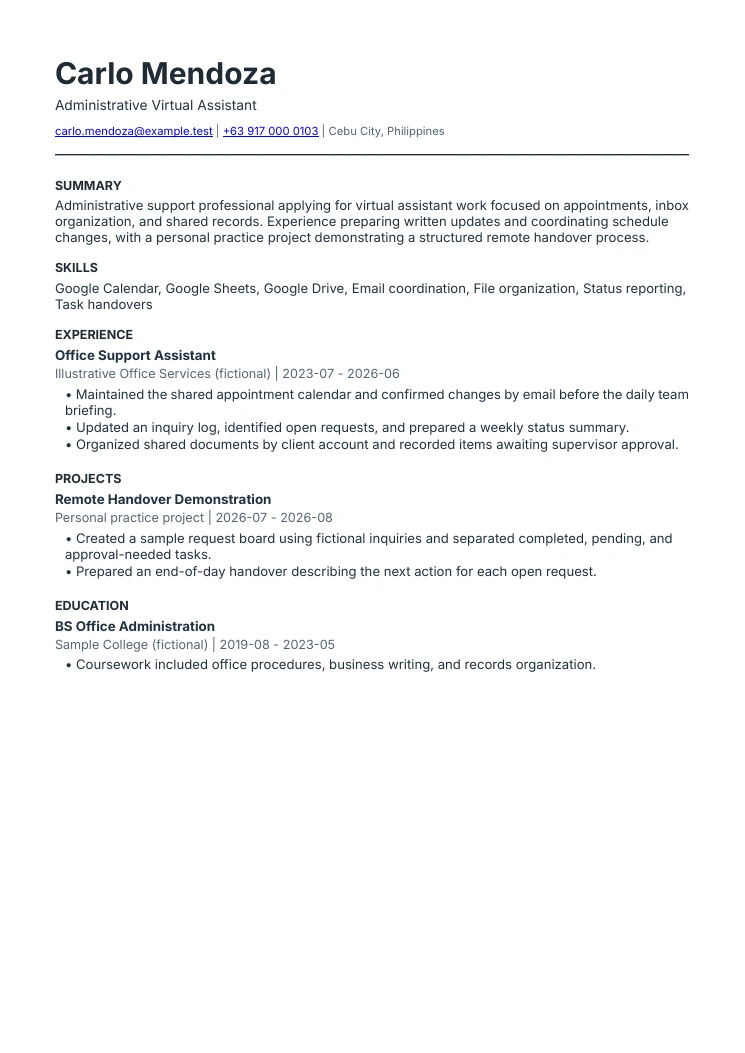
Virtual assistant resume example
The VA focus is specific
This example focuses on administrative support. It does not claim bookkeeping, marketing, or technical expertise that the sample history does not support.
Office experience is not renamed
The applicant’s previous title remains Office Support Assistant. The summary explains its relevance to virtual assistant work.
Practice work is labeled honestly
The remote handover demonstration is a personal project using fictional information, not a fabricated paying client.
Compare requirements with your real experience.
Explore the plans for basic matching, evidence-based Job Description Match Score, and tools to organize each application.
Explore job matching tools Compare plans and included featuresCommon questions
Should I apply if I do not meet every preferred requirement?
Review the difference between essential and preferred criteria and make an informed decision. Be accurate about gaps. Required licenses or other explicit eligibility conditions need separate attention.
Should I paste the job description into my resume?
No. Select relevant terminology only where your own experience supports it, and explain the work in your own words.
Sources & further reading
These references support specific guidance or product details. The examples and suggested workflows in this article are illustrative.
- CareerOneStop: targeting a resume
Further reading on maintaining a master resume and preparing targeted versions for specific opportunities.