
 RESUME BUILDER & ATS CHECKER
An applicant tracking system can store applications and help an employer manage hiring. Some systems also extract information from a resume into fields. A readable document gives both the software and the person reviewing it a clearer starting point.
An ATS-friendly resume is a practical formatting goal, not a certificate that every employer’s system will accept or rank you highly. Start with the instructions in the vacancy, then check the document’s structure and the accuracy of anything the application form extracts.
What to take away
- Use familiar headings and a straightforward reading order.
- Check that the file contains readable text, not just an image.
- Treat a readiness score as editing feedback, not an interview prediction.
Unahin ang malinaw na headings at tamang pagkakasunod ng text. Subukang i-copy ang text mula sa PDF para makita kung nababasa ito nang maayos. Ang checklist score ay gabay sa pag-edit, hindi garantiya ng interview.
Try this with your own details
- Export a text-based PDF or Word document in the format requested by the employer.
- Copy its text into a plain-text editor and check the order of names, headings, dates, and bullets.
- Correct any missing or misplaced details and review the fields extracted by the actual application portal.
Understand parsing before chasing a score
Parsing is the attempt to read a document and place details such as your name, roles, and education into separate fields. It is one part of an application process. It does not tell you everything about how a particular employer filters, reviews, or selects applicants.
Greenhouse’s own support guidance lists image-only uploads, columns, tables, and some header or footer arrangements among possible causes of incomplete parsing. That is a useful reason to simplify your layout, but it is evidence about one product rather than a universal rule about every ATS.
Give the document one clear reading order
A single-column layout is an easy starting point because the intended sequence is obvious. Put contact details in the main body near the top. Keep skills and dates as text, and use headings such as Experience, Education, Projects, and Skills.
Do not put important qualifications only in icons, graphs, progress bars, or a decorative sidebar. “Excel: weekly reporting and pivot tables” communicates more than a row of colored dots. A design can still have personality through careful spacing and a restrained accent color.
- Keep organization, role, and dates together for each entry.
- Write your email address as visible text.
- Use consistent date formats throughout the document.
- Avoid manually inserting spaces between every letter of a heading.
Try a plain-text reading check
Open your exported resume, select its text, and paste it into a plain-text editor. Read from the beginning. Your name should still be recognizable, headings should make sense, and bullets should stay near the roles they describe. This catches obvious problems, although it does not reproduce an employer’s parser.
If you cannot select the words, you may have a scan or image-only document. Create a text-based export from the original document where possible. After uploading to an application portal, review every prefilled field before continuing; even a simple document can be read imperfectly.
Use job language where your evidence supports it
A job description helps you see which capabilities the employer wants to assess. If you have actually scheduled meetings in Google Calendar, say so. If you have never used the CRM named in the vacancy, do not add it simply to make your resume look closer to the posting.
Explain abbreviations when doing so makes the meaning clearer, and keep official job titles accurate. A short contextual description can explain an unfamiliar title without rewriting your work history. Repeated keywords, hidden text, and copied job descriptions do not give a reader evidence of your ability.
Use the checklist to choose your next edit
ResumeTidy’s readiness result is a 10-point content-and-format checklist. Use its breakdown to find an incomplete section, a missing contact detail, or experience that needs a clearer explanation. The result is not an official score from Greenhouse, Workday, or the employer receiving your application.
Review the suggested correction against your real background. Add relevant information you omitted, remove ambiguity, and check the export again. A complete checklist still cannot establish whether you meet a required license, whether a role is a good match, or whether an employer will offer an interview.
Worked resume example
Inspect the selectable text and reading order in a real ResumeTidy PDF and Word export. Try the plain-text check described above.
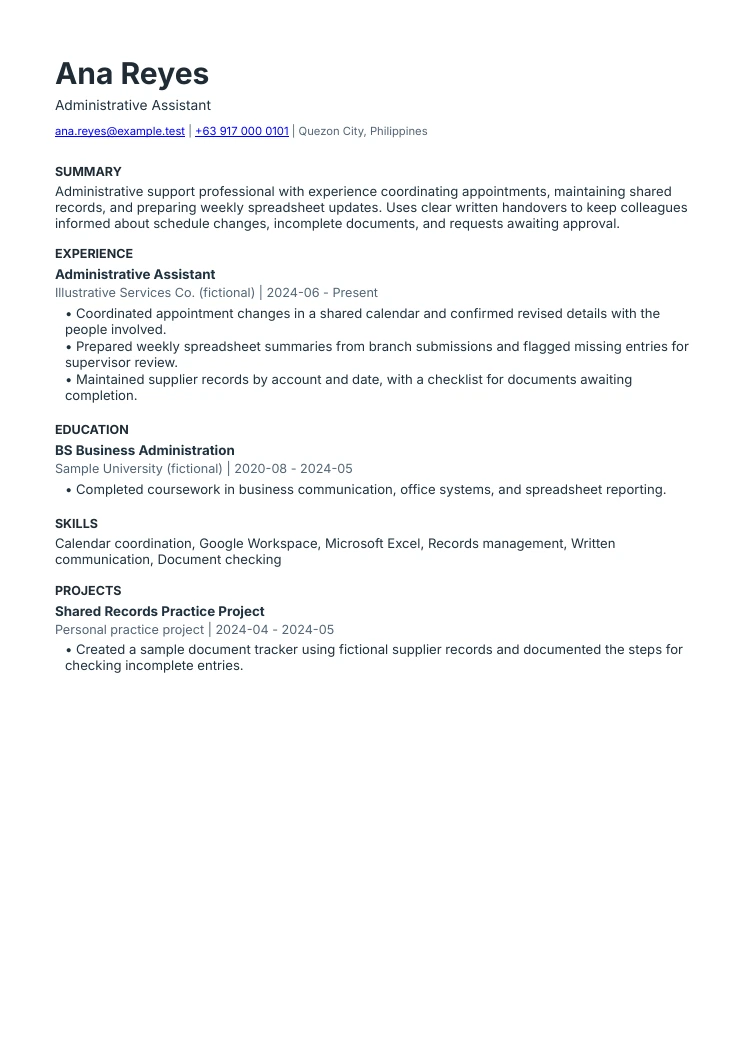
Administrative assistant resume example
The summary names actual work
Scheduling, records, and spreadsheet updates explain the type of support. The experience section provides the supporting examples.
Responsibilities have clear boundaries
Flagging an entry for supervisor review is different from approving it. This sample keeps that distinction visible.
The layout follows one reading order
Contact details, summary, experience, education, skills, and projects are text-based. The downloads are produced by the same renderer as ResumeTidy exports.
Give your resume a practical check.
Review your document’s content and structure, then use the checklist to decide what to edit next.
Explore the resume checker Compare plans and included featuresCommon questions
Does a high ATS readiness score guarantee an interview?
No. ResumeTidy checks content and formatting. Employers use their own requirements, systems, and review processes, and a checklist score does not predict a hiring decision.
Are all two-column resumes rejected?
No universal rejection rule applies. Complex reading order can make parsing harder in some systems. A simple layout and a check of the uploaded fields are practical precautions.
Sources & further reading
These references support specific guidance or product details. The examples and suggested workflows in this article are illustrative.
- Greenhouse: unsuccessful resume parsing
The vendor documents several formatting and file issues that can produce partial or failed parsing. This article does not claim those behaviors apply to every hiring system.