
 RESUME BUILDER & ATS CHECKER
After several applications, small details become hard to remember: which resume you sent, when the recruiter replied, or whether you already followed up. A tracker gives each opportunity a place and makes the next action visible.
You can start with a spreadsheet or a job-search tool. The important part is a workflow you will maintain. Add an entry when you apply, update it when something changes, and review it at a regular time instead of trying to reconstruct the week from memory.
What to take away
- Record the opportunity, the version you sent, and the next action.
- Keep application stages consistent enough to review.
- Use weekly patterns to choose one improvement, not to judge yourself by raw volume.
Hindi kailangang komplikado ang tracker. Itala ang company, role, petsa, resume version, at susunod na gagawin. Sundin ang instructions ng employer tungkol sa follow-up.
Try this with your own details
- Record one actual application with its role, employer, date, and submitted resume version.
- Add its current status and one next action you control, such as preparing a work sample.
- Review the record before a follow-up so you can follow the employer’s instructions and avoid duplicate applications.
Start with a small set of useful fields
A tracker is easier to maintain when every field has a purpose. Record the company, role, application date, job link or saved notes, current stage, and next action. Add the resume and cover letter version so you know which evidence the employer has seen.
If you keep recruiter contact details, record only what is appropriate for your application and protect access to your tracker. Avoid adding unrelated personal information or private correspondence to a public portfolio or shared sample.
| Field | Why it is useful |
|---|---|
| Company and role | Identifies the opportunity without opening the vacancy again. |
| Applied date | Keeps your timeline clear. |
| Stage | Shows whether the application is submitted, in conversation, closed, or awaiting a step. |
| Resume version | Connects the application to the document you sent. |
| Next action and date | Turns the entry into something you can act on. |
| Notes | Captures agreed timings, interview details, or questions to prepare. |
Use a few stages and an honest status
Choose stage names you can apply consistently: preparing, submitted, screening, interview, offer, closed, or withdrawn. An unanswered application can remain submitted until you receive a decision or choose to close it. A label should reflect what you know, rather than a guess about the employer.
Do not record “interview” just because you sent a follow-up. Separating facts from next actions makes the review more useful. You can note that a reply is pending without treating it as either success or rejection.
Plan follow-ups around the employer’s instructions
Record an agreed response date or the process described in the vacancy. If the employer asks applicants not to follow up, respect that instruction. When a follow-up is appropriate, keep it brief and give enough detail to identify the application.
A reminder is a prompt to review the situation, not a rule that a message must be sent. Before following up, check whether a reply arrived, whether the opportunity is still open, and whether you have already contacted the same person. Automated reminders should support judgment rather than create repeated messages.
Use a short weekly review to choose the next improvement
Review the active opportunities first: upcoming interviews, requested documents, and deadlines. Then look at what happened during the week. Did you apply to roles that fit your evidence? Are your targeted versions ready? Is there a recurring skill gap you can address with a small project?
Raw counts can be misleading when applications are at different ages or target different kinds of work. A week with fewer applications and better preparation may still be productive. Choose one change you can evaluate rather than rewriting everything after a small sample.
- Update stages from actual replies and decisions.
- Review the next action for every active opportunity.
- Prepare examples for upcoming interviews.
- Check whether resume versions fit the roles you targeted.
- Choose one practical learning or application task for next week.
Connect the tracker to your application materials
ResumeTidy includes basic application tracking for all accounts. Job Hunt and Career add an Application Kit and follow-up planning, with optional email reminders where configured. Save the relevant resume, cover letter, and checklist together so the tracker links back to the actual application.
Career also includes a Job Search Weekly Report and Career Milestone Tracker. Use the report to review recorded activity and the milestones for tasks you control, such as completing a practice project or preparing interview examples. A report can summarize your data, but it cannot reveal why an employer made a hiring decision.
Worked resume example
Practice naming the version you would submit and recording its next action. The weekly worksheet keeps the review focused on useful decisions.
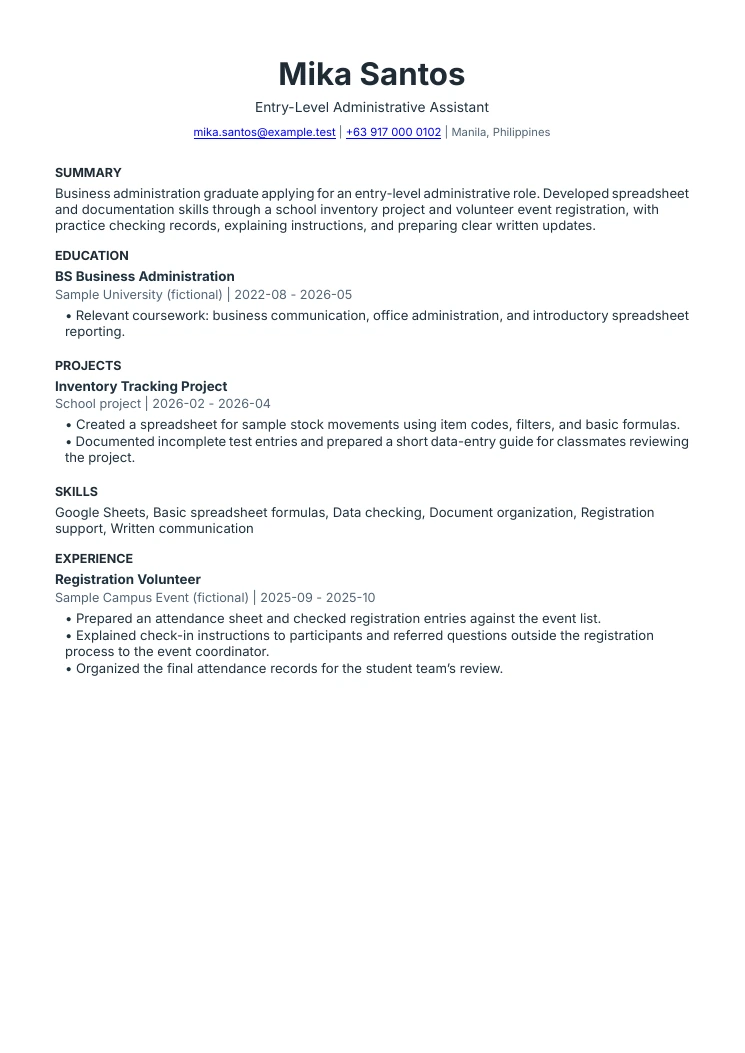
Fresh graduate resume example
Education and projects lead the story
The qualification and school project provide evidence for an entry-level role. There is no empty employment section or invented paid position.
Volunteer work keeps its real label
Registration support demonstrates organization and communication while remaining clearly identified as volunteer experience.
Skills have a visible example
Spreadsheet formulas, checking records, and preparing instructions appear in the project or volunteer responsibilities.
Keep your next step visible.
Create an account for basic application tracking, or compare plans for application kits, follow-up planning, and Career reports.
Explore the application tools Compare plans and included featuresCommon questions
Do I need a paid tool to track applications?
No. A maintained spreadsheet can work, and ResumeTidy includes basic application tracking for all accounts. Paid plans add specific workflow tools; choose them based on what you need.
How often should I review the tracker?
Update it when an application changes and choose a manageable regular review time. The weekly routine in this article is a suggested workflow, not an employer requirement.
Sources & further reading
These references support specific guidance or product details. The examples and suggested workflows in this article are illustrative.
- ResumeTidy: current plan and feature details
Product source for basic tracking, Job Hunt application kits and follow-ups, and Career milestones and weekly reports. The workflow above is an editorial suggestion.