
 RESUME BUILDER & ATS CHECKER
A useful resume helps an employer answer three questions: what work are you applying for, what can you already do, and where is the evidence? You do not need a dramatic introduction or an elaborate design to answer them well.
This guide walks through a first draft for an ordinary job application in the Philippines. Use the employer’s instructions whenever they ask for a particular form, file type, language, or supporting document. Keep a separate master record of your experience so you can adapt each application without starting again.
What to take away
- Choose one target role before deciding what belongs on the page.
- Explain your work with specific, accurate examples.
- Review the exported file and the application instructions before sending.
Pumili muna ng isang trabahong aaplayan. Isulat ang totoong pinag-aralan, mga gawain, at skills mo bago pumili ng design. Puwedeng magsimula sa simpleng notes; hindi kailangang pulido agad ang English.
Try this with your own details
- Open one vacancy and note the role and three main responsibilities.
- Write one real example from work, OJT, school, or volunteering for each relevant responsibility.
- Organize those notes into contact details, a short summary, education, experience or projects, and skills.
Start with the job you want to do
Open one realistic vacancy and write down its main responsibilities. An administrative assistant application might need scheduling, records, and written communication. A customer support application might need handling inquiries, explaining policies, and documenting issues. These are different stories, even when they come from the same work history.
Make a small evidence bank before writing: jobs, internships, school projects, volunteer work, tools used, and problems handled. Beside each item, note what you personally did. You can then select relevant evidence rather than filling a template with everything you remember.
Make it easy to contact you
Place your name, working email, phone number, and city or region near the top. Check that your voicemail and email address are suitable for an application. Add a relevant portfolio or professional profile only if it is ready for an employer to view.
You can usually leave out a full street address and unrelated personal details from an initial resume unless the application specifically asks for them. A resume and an employer’s detailed application form serve different purposes. Share additional information through the appropriate application process when needed.
Choose an order that supports your application
For someone with relevant employment, a practical order is contact details, short summary, experience, skills, and education. A fresh graduate may put education and a strong project above less relevant part-time work. Keep section names familiar so a reader can find information quickly.
Within employment and education, work backward from the most recent entry. Include the role or qualification, organization, and clear dates. Label internships, volunteer roles, and personal projects accurately instead of presenting them as paid employment.
| Section | What to include |
|---|---|
| Summary | Target role and two or three supported strengths. |
| Experience | Your responsibilities, methods, and useful results. |
| Education | Qualification, institution, and completion or expected completion date. |
| Skills | Relevant tools and abilities you can demonstrate. |
| Projects | Your contribution, the output, and a suitable work sample. |
Turn duties into evidence
Begin a bullet with what you did, add the context or tool, and explain why the work mattered. Useful detail can be the type of requests you handled, the document you maintained, or the process you improved. An accurate description is more useful than an impressive number you cannot explain.
If several people worked on an outcome, state your contribution. “Prepared the attendance sheet for the event team” is clearer than taking credit for organizing an entire event when you handled registration only.
Keep the layout readable, then check the actual file
Start with one column, clear headings, comfortable spacing, and a readable type size. A short entry-level application may fit on one page; relevant experience can justify more. Remove repetition before shrinking the text. Use a photo only when appropriate for the application requirements, rather than assuming it belongs on every resume.
Read the PDF or Word document you will submit, not just the editor preview. Look for broken page breaks, outdated links, inconsistent dates, and missing contact details. Make sure your resume, cover letter, and application form agree about your role titles and experience.
- Save a master draft before making job-specific changes.
- Check every employer name, date, credential, and link.
- Use a clear filename such as Ana-Reyes-Administrative-Assistant-Resume.pdf.
- Follow the vacancy’s upload format and size limits.
Worked resume example
See how the contact details, summary, experience, and skills fit together in one complete document.
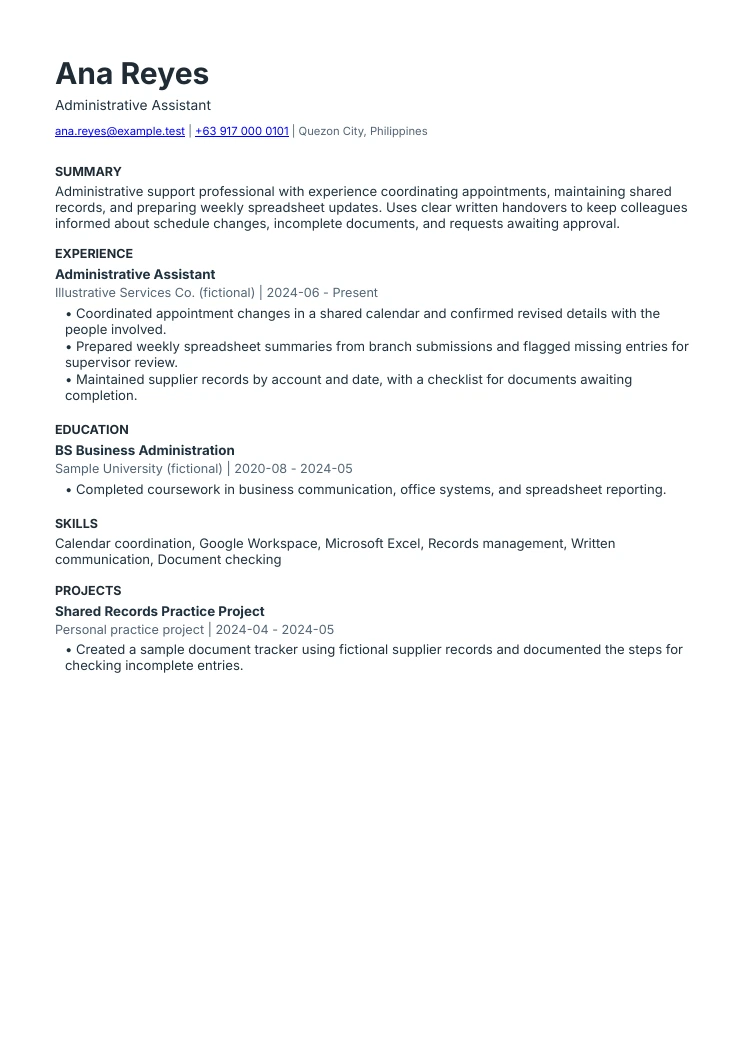
Administrative assistant resume example
The summary names actual work
Scheduling, records, and spreadsheet updates explain the type of support. The experience section provides the supporting examples.
Responsibilities have clear boundaries
Flagging an entry for supervisor review is different from approving it. This sample keeps that distinction visible.
The layout follows one reading order
Contact details, summary, experience, education, skills, and projects are text-based. The downloads are produced by the same renderer as ResumeTidy exports.
Turn your notes into a resume.
Use ResumeTidy’s guided editor to organize your real experience, choose a layout, and review your draft.
Start your resume Compare plans and included featuresCommon questions
Can I write my resume in English?
Use the language requested by the employer. For an English-language vacancy, clear English is a practical starting point. Keep official qualification and organization names accurate.
Do I need to pay before writing a draft?
Manual editing in ResumeTidy is free. AI actions and finalizing a version for PDF and Word use credits. Check the current pricing page for the complete terms.
Sources & further reading
These references support specific guidance or product details. The examples and suggested workflows in this article are illustrative.
- Harvard Mignone Center: creating a strong resume
Further reading on specific, factual resume language and selecting relevant experience. The examples in this article are original illustrations.