
 RESUME BUILDER & ATS CHECKER
The first rule of choosing a resume file is simple: follow the application instructions. If the employer requests a Word document, send the requested Word format. If the portal asks for PDF, use PDF. A general preference should not override an explicit requirement.
When both are accepted, choose a clean file you can check properly. PDF is useful for preserving a finished layout; DOCX is an editable document format. Either can contain problems, so the real task is to review the exact export and the receiving application.
What to take away
- Use the file type requested by the employer or portal.
- Check readable text and the exported layout, whichever format you choose.
- Review uploaded fields instead of assuming the file was parsed perfectly.
Sundin muna ang file format na hinihingi ng employer. Buksan ang mismong PDF o Word na ipapasa mo at i-check ang text, links, at page breaks. Magkaiba ang preview sa aktuwal na file na matatanggap nila.
Try this with your own details
- Check the vacancy or upload form for the required file type and size limit.
- Open the final exported file and inspect contact details, reading order, links, and page breaks.
- Use a clear filename and confirm that the selected upload is the correct resume version.
Read format and size instructions together
A portal may specify the extension, maximum size, filename, or number of attachments. Check all of them before exporting. A correct file type can still fail an upload because it exceeds a limit or because the application expects a separate cover letter.
Do not rename a file extension to imitate another format. Changing “.jpg” to “.pdf” does not create a text-based PDF, and changing “.pdf” to “.docx” does not make it editable Word content. Export the intended format from a document tool.
Know the practical difference
A PDF is designed to present a finished page layout. It can be convenient when you want the reader to see a particular arrangement. Still check page breaks, fonts, link behavior, and whether the file contains selectable text.
A DOCX can be edited in compatible word-processing software. Layout can change when fonts or applications differ, so reopen the downloaded document and inspect it. If someone explicitly needs an editable copy, a PDF does not meet that request by itself.
| Situation | Practical next step |
|---|---|
| The employer specifies PDF | Send a readable PDF and check the upload limit. |
| The employer specifies Word or DOCX | Export a DOCX and inspect it in a compatible editor. |
| Both are accepted | Choose a tested, readable version with a simple structure. |
| The portal fills in application fields | Review the extracted names, dates, and roles manually. |
| You only have an image of a resume | Recreate or export the source document as readable text. |
Check whether the document contains usable text
Try selecting a sentence and copying it into a plain-text editor. Look at the order of the content and whether letters remain readable. This is a useful basic check, although it cannot test every parsing system an employer might use.
Greenhouse documents image uploads and complex formatting among potential parsing problems. That is a reason to inspect the file and the prefilled fields, rather than assuming an attractive page was read accurately. A PDF made from a scan is different from a PDF exported with text.
Review the file you will actually send
Open the downloaded file from the folder where you saved it. Do not rely on an older attachment, a screenshot, or an editor preview. Check the first and last page, the contact line, headings, dates, and any links to professional work.
For Word, also check that no editing comments, tracked changes, or placeholder text remain in a manually revised file. For both formats, use a clear filename. Avoid including unrelated identity documents or private notes in the same attachment.
- All pages open and the text can be read comfortably.
- Contact details and professional links are correct.
- No heading is stranded above a page break.
- The filename identifies you and the application.
- The file type and size match the instructions.
Understand ResumeTidy’s two-format export
In ResumeTidy, finalizing a resume version uses one credit and provides PDF and editable Word downloads for that version. A successful AI draft is a separate one-credit action. Manual editing and live editor checks are free.
Downloading the same finalized version again does not use another credit. If you need to change a finalized resume, create a revision and review it before finalizing the new version. Uploaded resume checks use their separate ATS allowance, so they are not the same thing as an export credit.
Worked resume example
Download both exports from the same source data and compare their text, page breaks, and link behavior in your own applications.
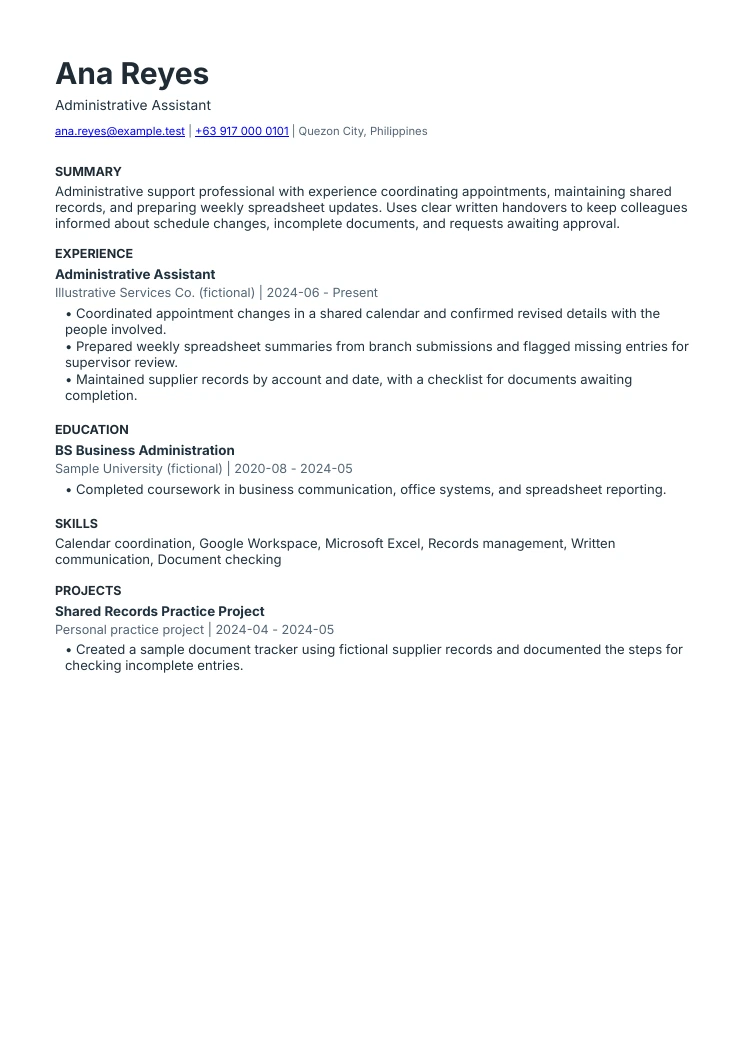
Administrative assistant resume example
The summary names actual work
Scheduling, records, and spreadsheet updates explain the type of support. The experience section provides the supporting examples.
Responsibilities have clear boundaries
Flagging an entry for supervisor review is different from approving it. This sample keeps that distinction visible.
The layout follows one reading order
Contact details, summary, experience, education, skills, and projects are text-based. The downloads are produced by the same renderer as ResumeTidy exports.
Prepare the format your application needs.
Start with a readable layout. Review the current plans for finalized PDF and editable Word versions.
See layouts and templates Compare plans and included featuresCommon questions
Is PDF always better for ATS applications?
No universal file preference applies. Follow the receiving system’s instructions and use a readable document with a straightforward structure. Check any information the portal extracts.
Does changing the filename extension convert the file?
No. Use a proper export or conversion that creates the intended document format, then inspect the result.
Sources & further reading
These references support specific guidance or product details. The examples and suggested workflows in this article are illustrative.
- Greenhouse: unsuccessful resume parsing
Vendor guidance distinguishes document uploads from images and lists formatting issues that can interfere with parsing. Its behavior is not a promise about other systems.