
 RESUME BUILDER & ATS CHECKER
Your resume is a focused application document. A professional profile can provide broader context, while a portfolio can show selected work. These pieces do not need identical wording, but they should agree about your experience, qualifications, and contribution.
Start with one clear direction and a few useful examples. You do not need a large website or a complicated personal brand to help someone understand your work. The most useful link is one that opens correctly, gives relevant evidence, and shares only what you intend to make available.
What to take away
- Keep titles, dates, qualifications, and achievements consistent.
- Use a headline and About section to explain your direction clearly.
- Distinguish public work samples from a private resume share link.
Dapat tugma ang dates, role titles, at project labels sa resume at online profile. Ipakita ang kontribusyon mo at piliin lang ang samples na puwede mong ibahagi. Tingnan ang page bilang signed-out visitor bago i-share.
Try this with your own details
- Compare one role or project across your resume, profile, and portfolio.
- Correct inconsistent dates, titles, contribution descriptions, and school or practice labels.
- Open each public link while signed out and confirm that the visible information and download permissions match your intention.
Give the three pieces different jobs and consistent facts
Use the resume to prioritize evidence for a particular vacancy. Use the profile to explain your wider experience and interests. Use the portfolio for selected outputs that a reader can inspect. You can change the emphasis without changing the underlying facts.
Check job titles, employment dates, education, and credentials across all three. If you explain an unfamiliar title with a short description, keep the official title recognizable. A career-change introduction can show where you are heading without claiming you already held the target role.
Write a headline that helps someone place your work
A practical headline names a role or starting point and one or two relevant capabilities. Avoid filling the space with broad claims such as expert, visionary, or best-in-class unless there is a clear, appropriate basis. Specific work is easier to understand.
If you are beginning a career, say what you are preparing for and what you have practiced. Do not add a senior title merely because it is your goal. Keep the wording accurate enough to use in a real introduction.
Make the About section sound like a clear introduction
Begin with the work you do or the role you are working toward. Add a few examples of tasks or projects, explain the problems you like solving, and finish with an appropriate way to connect. First person can work well here because the section is an introduction rather than a list of resume bullets.
Read the draft for claims you would struggle to explain in a conversation. Replace a broad promise with an example. If AI helps you draft, correct anything it adds about years, tools, results, or industries that is not in your actual background.
Choose work samples that explain your contribution
Two well-explained projects can be more useful than a long gallery with no context. For each sample, state the problem, your role, what you made, and the result or completed output. Label school, personal, and simulated work accurately.
Use material you are allowed to share. Remove client data, internal records, private contact details, and credentials. If a genuine work sample cannot be published, create a clearly labeled demonstration using fictional information rather than exposing someone else’s documents.
- A short title that tells the reader what the project is.
- A description of your contribution, separate from the team’s.
- The tools and methods you actually used.
- A relevant output or link with working permissions.
- A clear label for practice work or fictional data.
Choose deliberately between public and private sharing
A public portfolio is intended to be available to anyone with its URL. Before publishing, review every visible field and decide whether to enable a resume download. A portfolio can reveal personal information even if it is not listed in search results.
ResumeTidy’s Career plan includes an optional Personal Portfolio Page with publication and resume-download controls. Job Hunt and Career also include a different tool: a private share link for a finalized resume, with a password, expiry, and revoke controls. Revoking a link cannot remove a copy that someone already downloaded.
| Sharing method | Useful distinction |
|---|---|
| Public portfolio | A selected presentation of work intended for visitors. |
| Private resume link | Controlled access to a particular finalized document. |
| Email attachment | A delivered copy that remains in the recipient’s possession. |
Test the experience as a visitor
Open your links in a signed-out window and on a phone. Confirm that samples open, text is readable, and download settings match your intention. Check that the resume links back to the correct profile and that an old project does not imply a qualification you no longer claim.
The Career plan’s LinkedIn headline and About drafts use one credit per successful result. ResumeTidy prepares copy for your review; it does not publish to LinkedIn for you. Read the current plan details before choosing the tools that fit your search.
Worked resume example
Use the profile planner to keep your headline, experience, project labels, and sharing choices consistent with the resume.
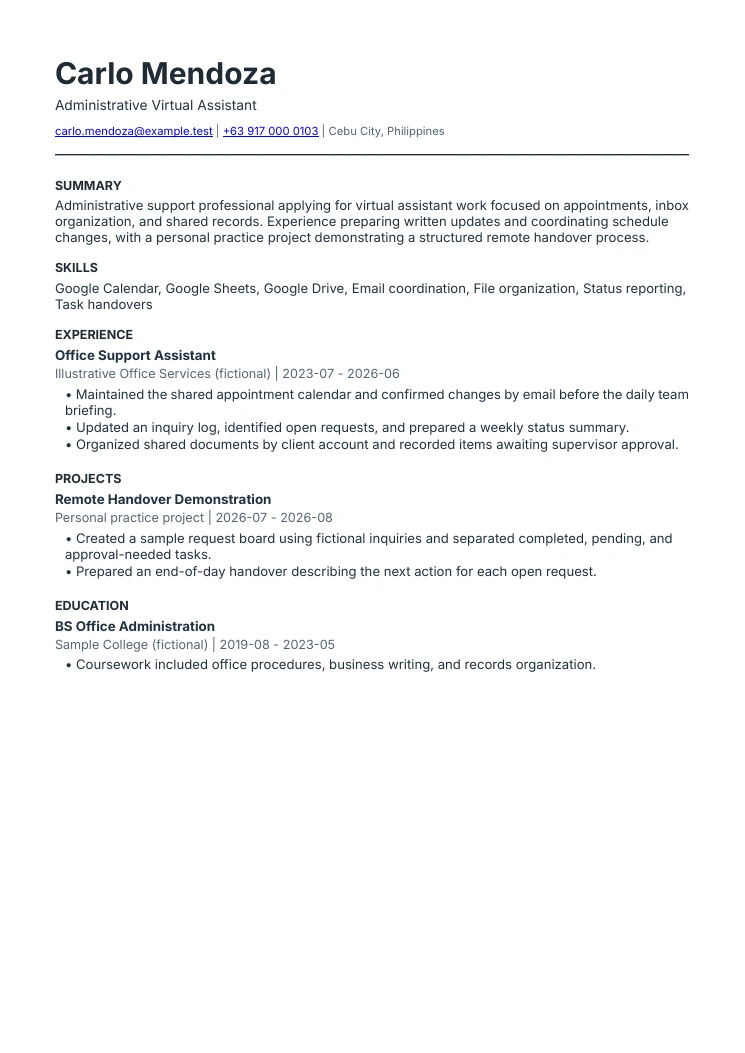
Virtual assistant resume example
The VA focus is specific
This example focuses on administrative support. It does not claim bookkeeping, marketing, or technical expertise that the sample history does not support.
Office experience is not renamed
The applicant’s previous title remains Office Support Assistant. The summary explains its relevance to virtual assistant work.
Practice work is labeled honestly
The remote handover demonstration is a personal project using fictional information, not a fabricated paying client.
Bring your application materials together.
Explore Career for a personal portfolio and LinkedIn drafts, with the Job Hunt tools included.
Explore Career tools Compare plans and included featuresCommon questions
Does ResumeTidy automatically update my LinkedIn profile?
No. It can prepare headline and About drafts in the Career tools. You review the wording and choose whether to use it in your own profile.
Does a private resume link make a portfolio private?
They are separate tools. The portfolio has its own publication controls, while a private resume link has a password, expiry, and revocation. Review both settings before sharing.
Sources & further reading
These references support specific guidance or product details. The examples and suggested workflows in this article are illustrative.
- LinkedIn: editing your professional headline
Official reference for managing the profile headline. Example wording above is original editorial guidance.
- CareerOneStop: portfolios
Further reading on using work samples as part of a professional application.
- ResumeTidy: feature and plan details
Product source for portfolio publication, private share links, and LinkedIn drafting tools.